

1CRM: The All-In-One Customer Relationship Management System
1CRM isn’t just a business CRM — it also serves as a powerful Citizen Relationship Management (CiRM) platform built to help government agencies, municipalities, and public service organizations deliver better citizen experiences, improve service responsiveness, and streamline internal operations.
A single integrated platform that scales with your needs
All-In-One CRM
Combines enterprise CRM with robust order, project, and case management plus a powerful reporting engine.
Make It Your Own
Make your 1CRM platform feel like home by choosing from multiple languages, themes and colour schemes.
Scales With You
Configure custom fields, drop-downs, modules, layouts and dashboards. Extend with integrations using open REST API.
What is Citizen Relationship Management? (CRM)
Citizen Relationship Management is an adaptation of traditional CRM tailored to government needs — focusing on centralizing citizen interactions, tracking service requests, and enhancing government-to-citizen engagement. Instead of sales leads, government agencies track inquiries, permit requests, complaints, service tickets, and feedback while ensuring transparency and accountability.
With 1CRM as a CRM platform, agencies can transform how they interact with the public — building a 360° citizen view, automating workflows, and improving response times.
Everything you need - within a single platform
Start your day with 1CRM
1CRM makes managing your daily activities effortless by letting you fully personalize how you track tasks, calls, meetings, and emails. Customize layouts, fields, and workflows to fit the way your team works, and design tailored documents with the PDF Form Designer. Stay organized with a drag-and-drop calendar that displays tasks, calls, project work, and reminders across your team.

Nurture meaningful relationships
Use 1CRM’s Marketing Automation capabilities to manage outreach activities to your community. Create webforms, send mass emails and newsletters and create partner networks all inside a CRM that is built to comply with data privacy legislation.

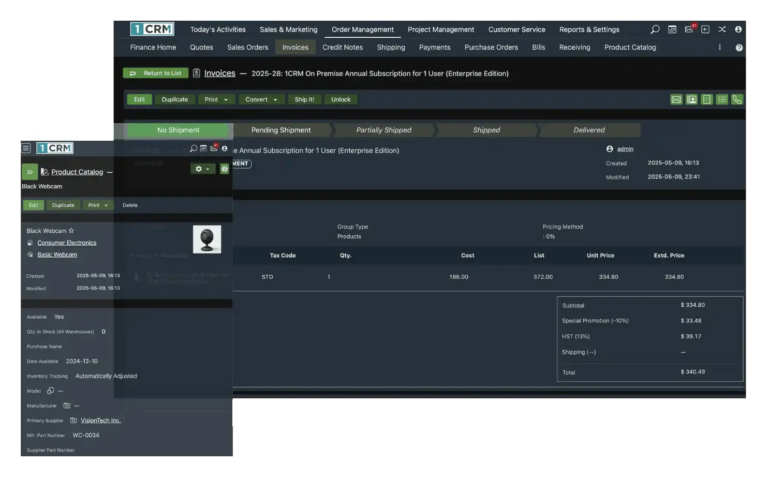
Track procurement requests and track assets
Simplify your public works, inventory, and vendor management processes. No spreadsheets required.
- Create and track Purchase Orders
- Receiving, Bills, and Payments
- Automatically adjust inventory by location or warehouse
- Match bills to POs for accurate accounting
- Generate audit-friendly reports on vendor performance
Never lose track of a project again
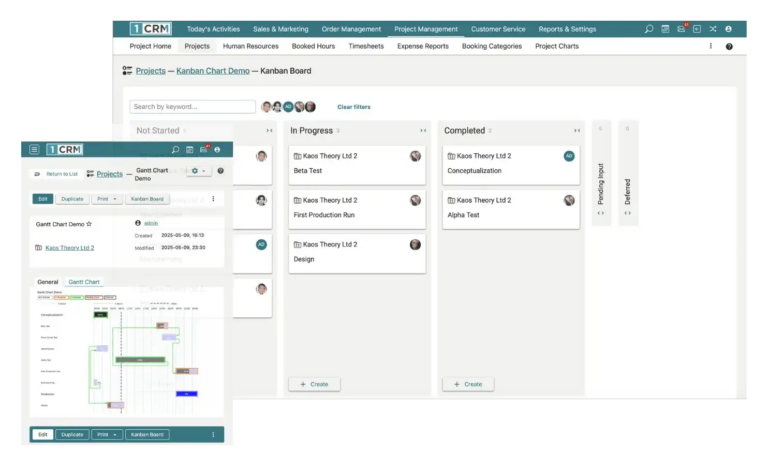
From infrastructure upgrades to community initiatives, 1CRM helps you plan, track, and execute projects with complete visibility.
- Create and manage Projects with milestones and deadlines
- Assign tasks to individuals or departments with status tracking
- Monitor budget, time spent, and resource allocation in real time
- Link related Cases, Contacts, and Documents to each project
Deliver a higher standard of care
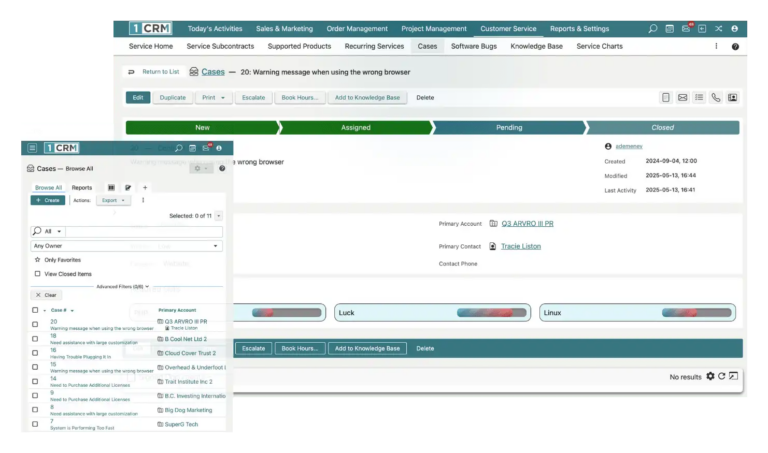
By leveraging 1CRM’s Customer Service modules you can deliver higher standards of service by:
- Automatically triage Cases to staff based on Service Skills, Priority and Case Age.
- Track tickets from creation to resolution
- Build an extensive Knowledge Base
A smarter way to manage requests, cases, and workflows
Centralized Citizen & Request Management
Manage citizen contact records, service requests, inquiries, and case histories in one secure system. 1CRM brings all interactions and data into a single dashboard view, helping staff quickly understand citizen needs and history.
Case & Service Request Tracking
Capture and track issues—from pothole reports to permit applications and noise complaints—through seamless portal integration. Internal teams can assign, prioritize, escalate, and monitor status, all within the CRM.
Automated Workflows & Faster Service Delivery
Automate routine processes like routing cases, notifying citizens of status changes, and generating follow-up reminders. These dynamic workflows help governments respond faster and deliver more consistent services.
Configurable for Government Needs
1CRM is highly adaptable — fields, modules, dashboards, and processes can be customized to match government terminology, department workflows, and citizen service priorities.
Secure & Compliant
With deployment flexibility, strong data protection, and encryption at rest and in transit, 1CRM meets the security and privacy expectations of public organizations, ensuring data residency and governance compliance.
Key Public Sector Benefits
Improved Citizen Experience
Citizens receive timely, transparent answers to their inquiries and requests, improving satisfaction and reducing frustration.
Operational Efficiency
Automated case routing, centralized data, and workflow automation reduce manual bottlenecks and help staff focus on high-impact work.
Cross-Department Collaboration
Departments like public works, licensing, community services, and HR share a unified platform, breaking down silos and improving responsiveness.
Data-Driven Government
Custom reports, dashboards, and analytics help decision-makers track trends in citizen requests, staffing needs, service delivery, and more.
Access 1CRM anywhere on web and mobile
Work smarter with 1CRM on any device. Access your CRM through a web browser on PC, Mac, Android, or iOS—or enjoy a dedicated app experience with the 1CRM Mobile App for Android.
For Apple users, 1CRM Client delivers a seamless experience across iPhone, iPad with split-screen support, and Mac, helping you stay productive anywhere.
Key features of 1CRM Client for Apple devices include:
- Secure login with credential memory
- Pull-to-refresh for real-time updates
- Integrated notifications
- Click-to-call directly from 1CRM Client on your iPhone
- Flexible email composition on iPhone, iPad, and Mac using either 1CRM’s email client or your device’s default mail app
1CRM for the Public Sector
1CRM converts traditional CRM features into tools that government teams need to better serve, engage, and manage interactions with citizens — from front-line case handling to back-office reporting and compliance.
This makes it an ideal platform for:
- Municipal government and small city offices
- Regional agencies and public utilities
- Citizen service departments (311, licensing, permits)
- Public works and service delivery teams
- Internal administrative functions
1CRM Software Features
Plans and Pricing
Professional
$33
Billed monthly in US$
| Feature | Included |
|---|---|
 | Purchase 1-Unlimited Users |
| Standard 1CRM Feature Set |
| Includes Support & Updates |
| Host Country Choice |
| Unlimited Accounts |
| Unlimited Targets, Leads & Contacts |
| 2GB/User Storage |
| Available with 1CRM Cloud or On-Premise |
Enterprise
$39
Billed monthly in US$
| Feature | Included |
|---|---|
| Purchase 1-Unlimited Users |
| Extended 1CRM Feature Set |
| Includes Support & Updates |
| Host Country Choice |
| Unlimited Accounts |
| Unlimited Targets, Leads & Contacts |
| 2.5GB/User Storage |
| Available with 1CRM Cloud or On-Premise |
Volume discount available
Government
Custom Government Pricing
For public-sector organizations requiring flexible limits, secure data handling, and enterprise-grade support.
Professional
$29
Billed annually in US$
| Feature | Included |
|---|---|
| Purchase 1-Unlimited Users |
| Standard 1CRM Feature Set |
| Includes Support & Updates |
| Host Country Choice |
| Unlimited Accounts |
| Unlimited Targets, Leads & Contacts |
| 2GB/User Storage |
| Available with 1CRM Cloud or On-Premise |
Enterprise
$34
Billed annually in US$
| Feature | Included |
|---|---|
| Purchase 1-Unlimited Users |
| Extended 1CRM Feature Set |
| Includes Support & Updates |
| Host Country Choice |
| Unlimited Accounts |
| Unlimited Targets, Leads & Contacts |
| 2.5GB/User Storage |
| Available with 1CRM Cloud or On-Premise |
Volume discount available
Government
Custom Government Pricing
For public-sector organizations requiring flexible limits, secure data handling, and enterprise-grade support.
Deliver Better Citizen Services
Empower your municipality or government agency with a secure Citizen Relationship Management platform that improves service requests, case handling, and public engagement.
Optimize Sales, Service & Operations
Streamline your sales cycle, automate marketing, manage customer service, and centralize your workflows in one flexible CRM platform.
A Platform Engineered for Performance & Flexibility
From deployment options to deep configurability, this solution gives organizations full control over how they build and deliver digital services.
Features
- All-in-One Solution
- Data Residency in Canada
- Highly configurable
- Flexible deployment
- Next-gen REST API
- Integrates with any CMS
- No minimum user count or implementation cost
Customer Testimonials
Thousands of clients rely on 1CRM every day to manage and grow their operations effectively.
“We found this CRM and incorporated into all aspects of our business from lead prospecting, service tickets, invoicing and quotes, email, project management and much, much more. It was very easy to customize and their support team is one of the best I’ve dealt with from a CRM vendor.”

Garett Llorente
Senior Executive Manager, Kewl Consulting Inc.

"1CRM has all of the features that I needed right out of the box, but also had a strong project management capability which allowed me to cut my costs further and provide that extra level of integration between my CRM and my project management tool."

Ronny Cheng
Co-Founder, Digital Astrontauts
“Amazing product. I have been using 1CRM for years and it was a great decision for my business. I love everything about it especially the quality and the cost.”

John Bura
CEO, Mammoth Interactive
Frequently Asked Questions
What are the main differences between each edition of 1CRM?
1CRM Startup and Startup+ have capacity limits for targets, leads, contacts, and accounts, which means that once you reach the limit, you cannot add any more records to the system. At that point, you can upgrade to Professional or Enterprise to continue adding. They also have user limits: Startup supports up to 3 users, and Startup+ up to 10 users. The free On-Premise Startup Edition cannot be updated as 1CRM evolves and includes 1CRM branding on PDF documents and sent emails.
1CRM Professional is our standard edition with no capacity or user limits and includes all regular 1CRM features. It also provides the REST API Service and access to the 1CRM Mobile iPhone App.
1CRM Enterprise is the most customizable edition, including the PDF Form Designer, Module Designer, and Price Books, in addition to all features of the Professional edition.
You can upgrade or downgrade your 1CRM system at any time by purchasing a new license key. Any amount already paid will be applied as credit toward the new edition, rather than refunded. To learn more, see Plans and Pricing.
What’s the difference between On-Premise and the Cloud Service?
1CRM provides two methods of deployment: On-Premise and Cloud Service.
On-Premise means you purchase user licenses and install the software on your company server, or possibly at your local ISP. This requires more setup and someone with enough technical expertise to maintain the server. On the other hand, you may prefer to keep your business-critical information on your own server rather than on someone else’s.
1CRM Cloud Service is often called Cloud CRM, SaaS, On-Demand CRM, or web CRM. With this option, you never have to install the software or maintain a server. You are simply provided with a URL to access your 1CRM system. Backups of your software and data are handled automatically, allowing you to focus less on IT and more on growing your business. This option starts at $13/user per month, and Support & Updates are included.
See Pricing for more details.
If I start using 1CRM On-Premise, can I switch to Cloud at a later date? Or from Cloud to On-Premise?
Yes, you can move from Cloud to On-Premise at any time. This is done by creating a backup to your computer or a service like Dropbox, then restoring that backup onto your own server.
If you or someone on your team is IT-capable, you can handle the process yourselves using our documentation. Instructions for creating a local backup and restoring it are provided in section 7.2.2 of the 1CRM Implementation Guide. If you prefer, we also offer this as a billable service.
To move from On-Premise to the Cloud, you need to take a backup and have it restored onto our cloud servers. This service is handled by us for a fee, typically $150.
Can I upgrade to Professional or Enterprise from Startup?
Yes! Simply purchase and apply a new license key from the Store, and all of your information will automatically be available in the upgraded edition.
Does the Startup Edition receive support or updates?
1CRM Startup Edition Cloud Service receives support and updates, while the free On-Premise software does not. We encourage Startup users to visit the Video Learning Library, review the User Guide, access the Online Help System, and visit the Community Forum to connect with other users.
Is the self-service portal and eStore included in the Startup Edition?
The portal is included free with every On-Premise edition of 1CRM, including the Free On-Premise Startup Edition.
On-Premise support subscriptions can be purchased separately if needed, or if you’d like to host a 1CRM Portal and eStore on the Cloud, we offer a 1CRM Cloud Portal Service via annual subscription.
Is the On-Premise Startup Edition really free?
Yes, it’s completely free—no catches. You don’t need a credit card to install or use 1CRM, and it’s not a trial, so you can use it for as long as you like. Up to 3 users can have access, making it ideal for small businesses.
Will 1CRM give refunds?
As stated in our terms of service, 1CRM does not issue refunds. If you are on a paid plan, you can cancel at any time, but you will not receive a refund for any unused portion of your subscription.
What payment methods do you accept?
For paid plans, 1CRM accepts all major credit cards, PayPal, and cheques. All prices are listed in US$.
How secure is my data in your 1CRM Cloud Service? Can I access the service using HTTPS?
Yes, you can access your 1CRM Cloud Service using either HTTPS or HTTP. HTTPS (HTTP over SSL or TLS) is enabled by a self-generated certificate installed on each 1CRM Cloud instance by default. If you prefer, you can install your own commercial certificate.
Your browser will need to support a feature called Server Name Indication (SNI) to access your 1CRM Cloud Service via HTTPS. For browsers that do not support SNI—primarily Internet Explorer on Windows XP—a commercial wildcard certificate for the entire 1CRM Cloud is available.
You can also perform regular backups of your 1CRM Cloud system using SSH, FTP, or Dropbox. Backups save both your data and the 1CRM software to the location of your choice.
What's the difference between the free Startup Edition and the 30-day Free Trial?
The On-Premise 1CRM Startup Edition must be downloaded and installed on your server. Up to 3 users have lifetime access to the system.
The 30-day Free Trial uses the 1CRM Cloud Service, so no installation is required. We provide a login link, and up to 5 users can access it for 30 days, after which you can decide if 1CRM is right for your business.
Can I use the 1CRM Cloud Service with the Startup Edition?
Yes! You can use the 1CRM Startup Edition Cloud Service for as little as $13/month.
Can I convert my free trial into a regular plan?
Yes! To save your data and continue growing your business with 1CRM, you can apply your trial license key to a new 1CRM subscription anytime before your 30-day free trial ends. See Plans & Pricing for more details.
Can I try before I buy?
Yes! You can start using 1CRM immediately with a completely free, full-featured 30-day trial—no credit card or installation required. You can also explore 1CRM right away by accessing the live demo.